Custom operational systems Built around your workflow Request a free demo trial ↗

Warehouse & manufacturing software

Control the flow.
See the whole picture.

Remax System creates custom software that connects stock, warehouse activity, production, and reporting in one clear operational workspace.

Scanner friendly Permission-based access Built for your workflow
R Operations control Live workspace
Good morningOperations overview
Available stock12,480Across all locations
Open movements38Receiving & dispatch
Production jobs14In progress today
Recent movementView all
ReferenceTypeStatus
IN RC-1048ReceivingComplete
TR MV-0281TransferIn progress
OUT DS-2094DispatchReady
Stock controlThis month
98%reviewed
Recorded To review

One connected operational view

RECEIVESTOREPRODUCEDISPATCHREPORT

One workspace for the
whole operation.

Give each team a clear view of the tasks, stock, and production information they need—without losing the detail behind every movement.

01

Day-to-day workspace

Move from receiving to finished goods in fewer steps.

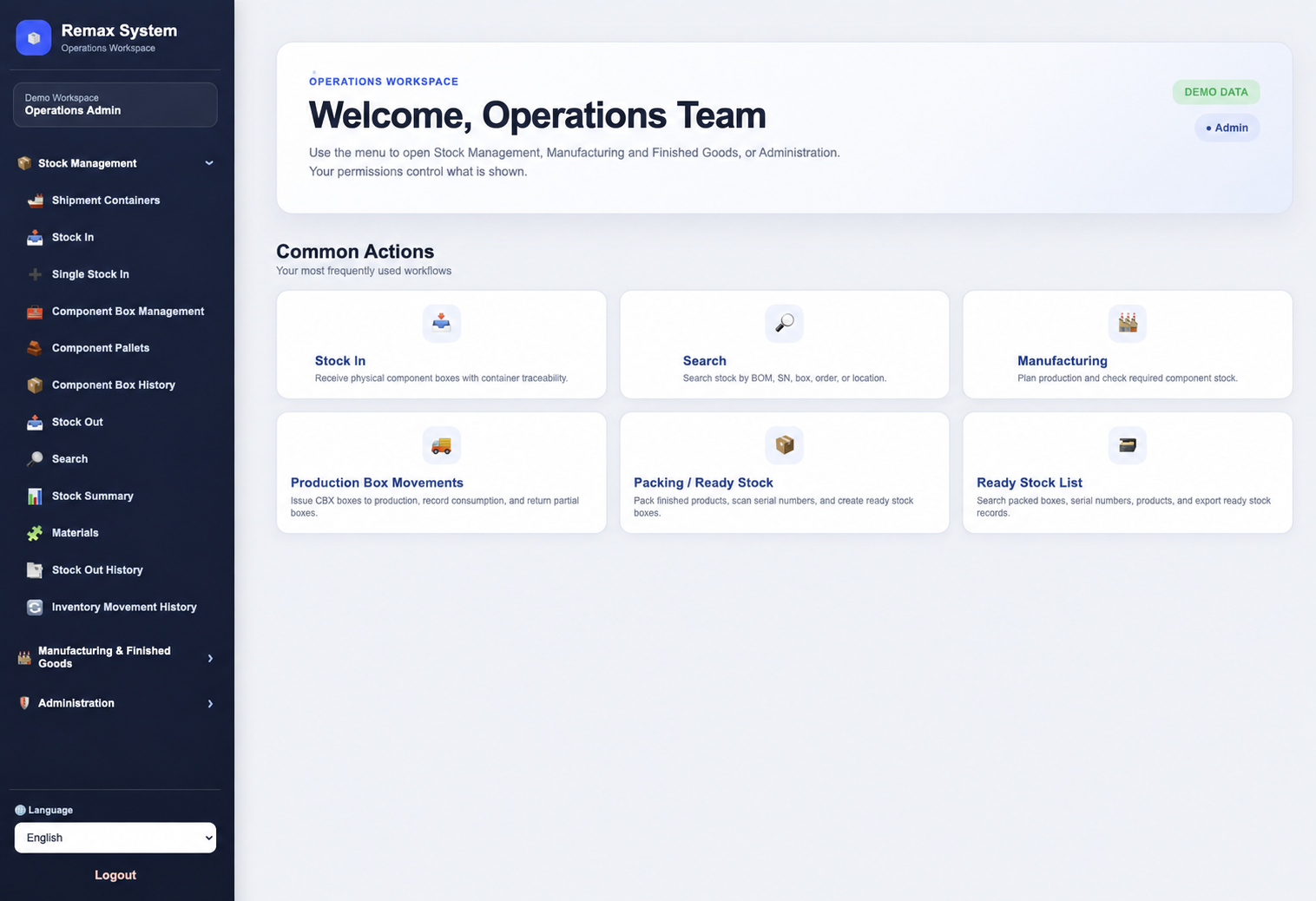
Role-based menus keep routine actions easy to find while bringing receiving, locations, materials, packing, and movement history into one connected system.

Role-based accessScanner friendlyBox tracking
Operations workspaceFictional demo data
Remax System sample operations workspace using fictional demonstration data
02

Live production visibility

See priorities, capacity, and shortages at a glance.

Production displays can surface the figures that matter to your operation, from ready stock and active jobs to available capacity and material exceptions.

Live status viewCapacity planningException alerts
Production controlFictional demo data
Remax System sample production control dashboard using fictional demonstration data
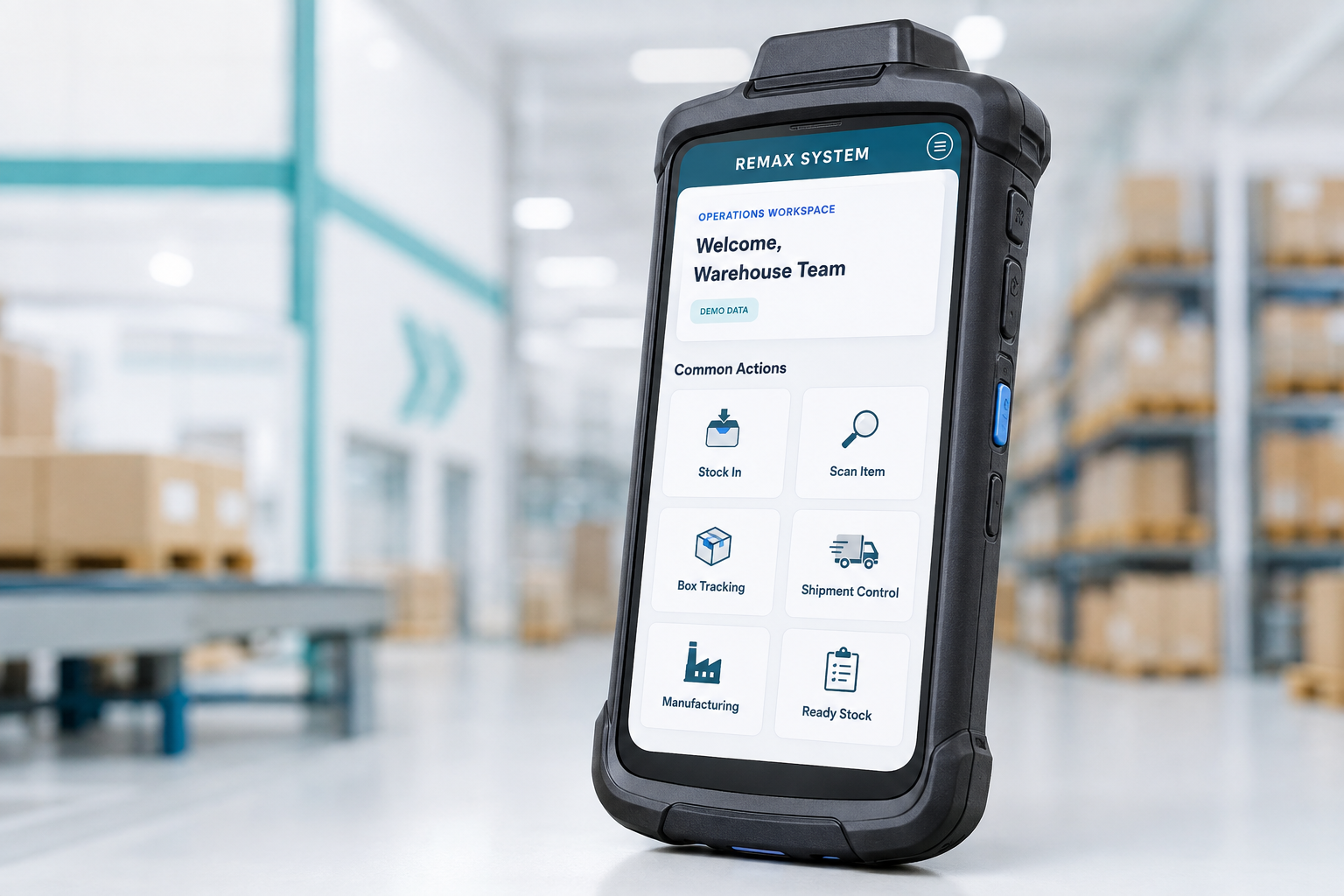
Rugged handheld warehouse scanner displaying a fictional Remax System mobile workspaceFictional demo screen

Scanner-friendly from stock in to dispatch.

Use compatible handheld scanners or mobile devices to scan barcodes, identify boxes, confirm locations, and record movements where the work happens.

  • 01Receive arriving stock and containers
  • 02Track boxes through in-house locations
  • 03Confirm picking, packing, and dispatch
Discuss scanner requirements

i Interface examples are shown with fictional demonstration data. Final screens, fields, and workflows are configured for each customer.

Your operation is connected.
Your software should be too.

Bring the movement of materials, finished goods, orders, and operational information into one system your team can understand and trust.

01

Receive

Record incoming stock with the right references, quantities, locations, and traceability details.

02

Control

Track availability, reservations, transfers, adjustments, and movement history across locations.

03

Produce

Connect materials to jobs, capture usage, and return finished goods to inventory.

04

Dispatch

Move picked and approved goods out with a clear, searchable transaction record.

More than stock counts.
A working system.

Choose the operational building blocks your business needs, then shape the detail around the way your team actually works.

SCAN

Scanner-friendly workflows

Use barcode scanners and mobile devices to speed up receiving, location moves, picking, packing, and stock checks.

USER

Users & permissions

Give each team member a secure login with access based on their role, responsibilities, and approved functions.

SHIP

Arriving shipment control

Register expected containers and shipments, monitor arrival status, and connect received goods to their source.

IN

Stock in & receiving

Capture deliveries, quantities, locations, batches, and supporting references as warehouse stock arrives.

BOX

In-house box tracking

Track each box as it moves between receiving, storage, production, packing, and dispatch areas.

LIVE

Inventory visibility

See available, reserved, damaged, and in-transit stock across warehouses, bins, and production areas.

PLAN

Production workflow

Connect material requirements, work orders, production usage, finished goods, and progress updates.

DATA

Reports that fit

Turn day-to-day transactions into practical stock, movement, usage, and operational reports.

PLUS

Custom business functions

Add specialised screens, approvals, documents, and workflows around your own operation. Additional fees may apply.

Turn activity into
decisions.

A useful system does more than store transactions. It surfaces the information needed to manage exceptions, priorities, and performance.

  • 01Know what stock is available and where it is
  • 02See movements and production activity in context
  • 03Find the history behind an item, batch, or reference
  • 04Build reports around the questions your team asks
Movement activityLast 7 days⌄
Stock in+ 1,840
Stock out− 1,205
Transfers286
Movement recordedWarehouse A → Production
Now

Different businesses.
Different workflows.

Remax System is positioned around the work, not a one-size-fits-all feature list.

01

Warehousing & distribution

Multi-location stock, receiving, transfers, picking, dispatch, and movement history.

Discuss this workflow ↗
02

Manufacturing

Materials, work orders, production usage, finished goods, traceability, and planning.

Discuss this workflow ↗
03

Wholesale operations

Purchasing, order allocation, stock availability, fulfilment, and customer delivery flow.

Discuss this workflow ↗
04

Specialised workflows

A system shaped around the approvals, terminology, documents, and reports unique to your team.

Discuss this workflow ↗

A clear path to
your system.

Start with the operation, define what matters, and build toward a system your team can use with confidence.

Start your project
01

Understand the operation

Map users, locations, stock movements, production steps, documents, and current pain points.

02

Define the right system

Agree on the workflow, data, roles, controls, outputs, and priorities for the first release.

03

Build and configure

Create the operational screens and reports around the approved requirements.

04

Roll out and improve

Introduce the system to the team, review real usage, and refine where the operation needs it.

Before we
get started.

Is Remax System an off-the-shelf product?+

Remax System builds configurable operational software around your real warehouse or manufacturing workflow. The final scope depends on your processes, users, locations, and reporting needs.

Can staff have different access permissions?+

Yes. Each user can have their own login, with permissions configured around their role and the functions they are authorised to use.

Can the system work with barcode scanners?+

Scanner-friendly workflows can be included for stock receiving, box tracking, warehouse movements, picking, packing, and stock checks. The final setup depends on your devices and process.

Can the system support more than one warehouse?+

Multi-location inventory, stock transfers, and location-level visibility can be included when they are part of your requirements.

Can it support manufacturing as well as inventory?+

Yes. A solution can connect raw materials, production usage, work orders, finished goods, and stock movements in one operational flow.

Can you build functions unique to our business?+

Yes. Specialised screens, documents, approvals, reports, and workflows can be scoped for your operation. Additional development fees may apply.

How do we get started?+

Email our sales team with a short description of your operation and your current challenges. We will use that to begin a requirements conversation.

See the system in action

Request your free
demo trial.

Tell us about your operation and which product you would like to explore.